MPS Handling Station
A 3-axis handling station in a networked Festo MPS manufacturing line, assembled, wired, and programmed to pass puck data to the stations around it.
- Role
- Team of two: assembly, wiring, PLC, and HMI
- Year
- 2026
- Status
- Complete
- Context
- EMSI 360 - Advanced PLCs
- Rev
- A
More views
Key numbers
- Pucks run
- At least 24
- Controller
- CompactLogix 1769-L24ER
- Sequence
- 53-step SFC
- Puck data shared
- Serial, color, good or bad
Overview
This project was a full manufacturing line built from Festo MPS stations that communicate through PLCs. I was in charge of one station, the 3-axis handling station, working in a team of two.
What I worked on
- Assembly: We put the station together from the start.
- Wiring: We used the circuit diagrams to connect all of the station’s I/O.
- Programming: I wrote the full PLC program and HMI so the station could run.
- Line communication: I programmed the station to communicate with the stations upstream and downstream, including transferring the puck data along the line.
How the station was planned
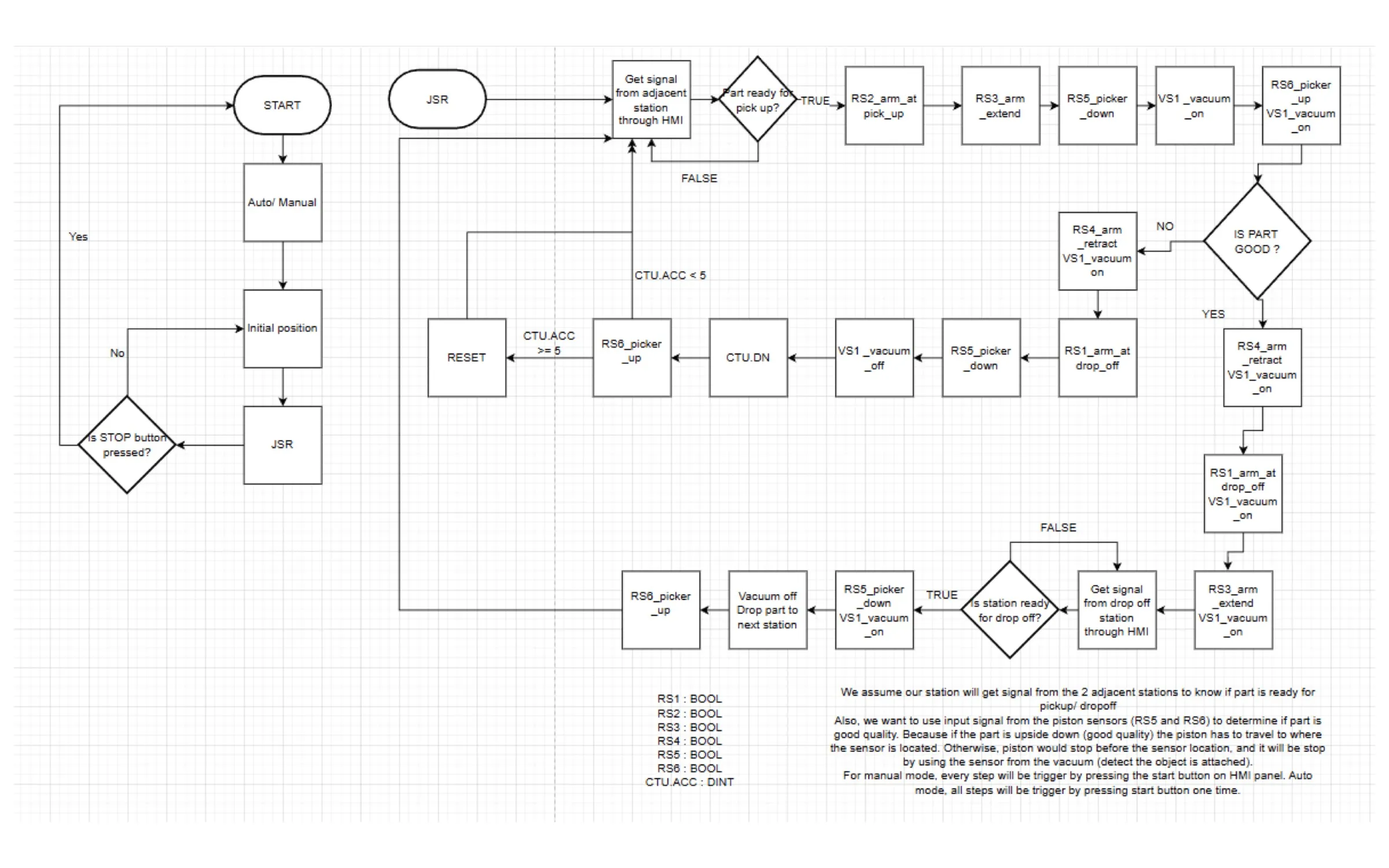
We planned the logic with the flow chart above before writing the program. After a start and mode selection, the station moves to its initial position and runs the handling routine until Stop is pressed.
- Check for a part: the station gets a signal from the adjacent station through the HMI and waits until a part is ready for pick-up.
- Pick up: the arm moves to the pick-up position, extends, lowers the picker, turns on the vacuum, and lifts the part.
- Check quality: the piston sensors decide whether the part is good. An upside-down part is a good part, because the piston can travel down to where the sensor is. Otherwise the piston stops before the sensor, and the vacuum sensor detects that the part is attached.
- Good part: the arm moves to the drop-off side and waits until the next station signals it is ready, then lowers the part, releases it, and lifts the picker.
- Rejected part: the arm moves to the drop-off side and releases the part. A counter tracks these drops and resets after 5.
In manual mode, each step needs a press of the Start button on the HMI. In auto mode, one press runs all of the steps.
The program
The station runs on an Allen-Bradley CompactLogix 1769-L24ER, programmed in Studio 5000. The sequence is a sequential function chart with 53 steps, and the operator screen is a Pro-face AGP-3200T connected over EtherNet/IP.
- Line communication: custom data types carry ready-to-send and ready-to-receive signals between the station, the four-position station upstream, and the six-position station downstream.
- Puck data: each puck’s serial number, color (black, red, or silver), and good or bad status are received from upstream and passed downstream.
- Good or bad check: a timer measures the picker’s travel down to help tell a good puck from a bad one.
- Counters and rate: the program counts good pucks up to 100 per operation, counts bad pucks up to the chute’s limit of 5, and calculates pucks per minute from the run time.
Auto mode was working by the end of the project, and the PLC file below includes that fix.
Results
The station ran on the line and passed at least 24 pucks with no issue, with the puck data passed through and displayed correctly on the HMI. An anomaly appeared after that, and the school deadline ended our troubleshooting before we found the cause. I didn’t record exact cycle times. I think about two more hours of troubleshooting would have sorted it out.
Files
Opening the PLC and HMI files requires Studio 5000 and GP-Pro EX.